
Estimates (quotes) explained
What this does
Section titled “What this does”An estimate (also called a quote) tells a customer what a job will cost before you do it. You send it, the customer approves or declines it online, and an approved estimate turns into a work order in one click, so you never type the same lines twice.
Where to find them
Section titled “Where to find them”Click Estimates in the left menu. The page lists every open estimate across all your customers: drafts, sent and approved (but not yet converted). You’ll also find each customer’s estimates on that customer’s page.
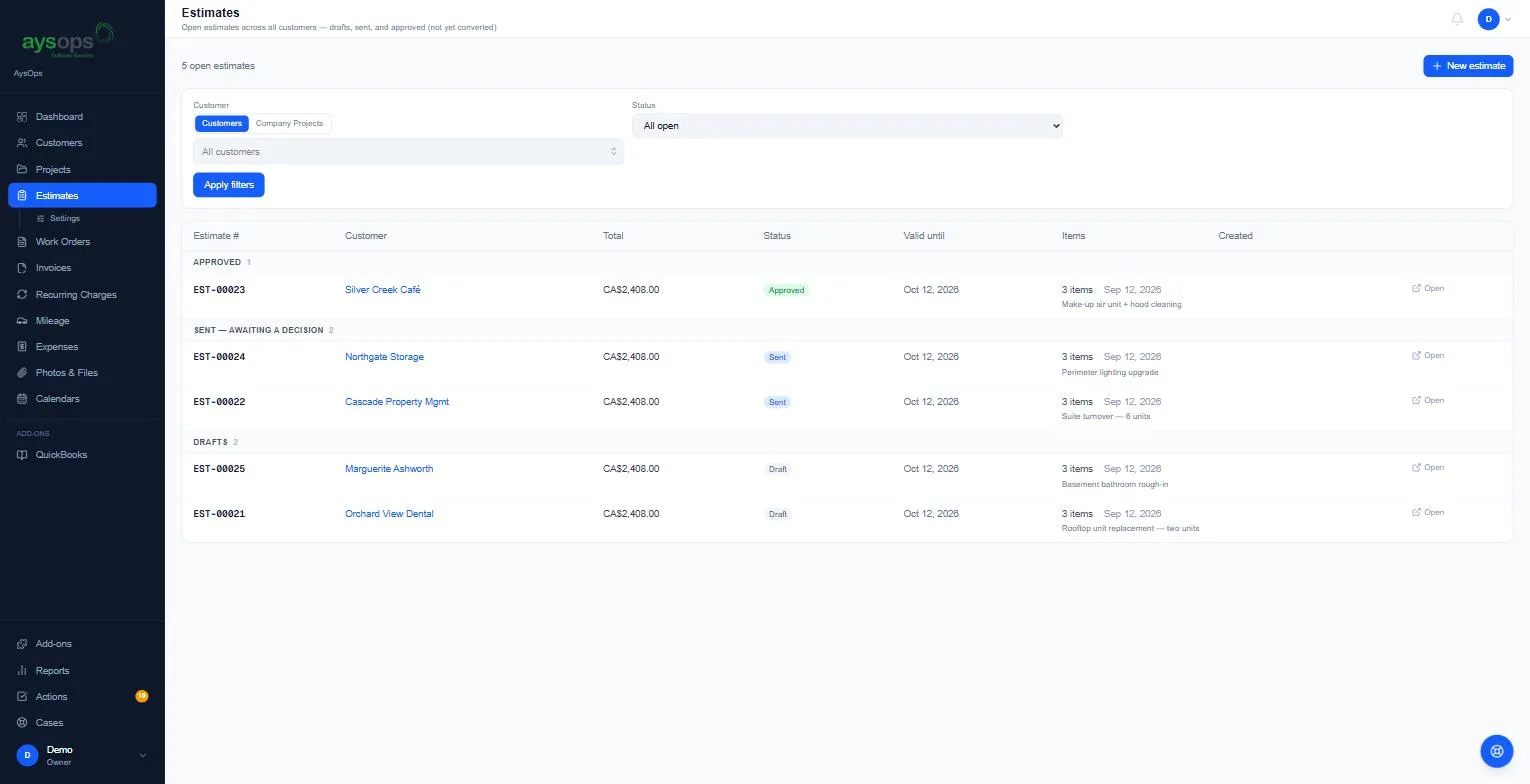
The list is grouped by status (Approved, Declined, Expired: revise and resend, Sent: awaiting a decision, Drafts) and shows the number, customer, total, status, Valid until date and number of items. Click Open on a row to open the estimate in a popup.
Approved or declined by your customer
Section titled “Approved or declined by your customer”When a customer approves a quote on their approval page, it’s pinned at the top of the page under Approved by your customer (ready to convert to a work order), with who signed and when. View what they approved opens the copy they signed and View signature their signature. Quotes a customer declined are pinned the same way under Declined by your customer, with their reason when they gave one and View what they declined. Dismiss all clears the panel once you’ve seen them; the estimates stay in the list below.
Click a group’s heading to fold it away or show it again. Declined and Expired start folded; the others start open. AysOps remembers what you folded on that device. While a filter is on, every group shows, so nothing you searched for is hidden.
Filters
Section titled “Filters”- Customer: switch between Customers and Company Projects, then pick one.
- Status: for example All open.
- Click Apply filters.
On a phone or a tablet, each estimate is a card in the same groups, with its number, status, customer, description, Valid until date, number of items and total. Tap a card to open it. The filters are folded away: tap Filters to show them.
The statuses
Section titled “The statuses”| Status | Means | Can you change the lines? |
|---|---|---|
| Draft | Not sent yet. | Yes |
| Sent | With the customer, waiting for a decision. | No. The customer may approve it at any moment. Use Recall first. |
| Approved | The customer approved it (or you marked it approved). | No. It’s agreed. |
| Declined | The customer said no. | Yes, then send it again. |
| Expired | The Valid until date passed before a decision. | Yes, then send it again. |
| Archived | Put away. Hidden from the open list. | No |
A quote whose Valid until date has just passed can show as Sent with · expired after the date for a little while, until AysOps’ daily check marks it Expired. Either way the customer can no longer approve it.
Labels next to the number tell you more, for example Deposit (a deposit is requested) or Signed online (the customer approved and signed on their approval page).
Unfinished worksheet drafts
Section titled “Unfinished worksheet drafts”If you started an estimate from a worksheet or a conversation and stopped part-way, it’s listed under Unfinished worksheet drafts (“Saved automatically”). Each one shows the customer (or No customer yet), how many AI rounds it used and what it has cost so far, the last change, and a kept until date. Click Continue to carry on where you left off; nothing you already paid for is run again. Discard removes it from the list; nothing is created and nothing is charged. See Create an estimate from a worksheet.