
Billing and your subscription
What this does
Section titled “What this does”The Billing page shows your AysOps plan, how long your free trial has left, what you’ll pay each month, and lets you subscribe, change your card or redeem a promo code.
Before you start
Section titled “Before you start”Only the owner and administrators can see Billing.
See your plan and what you’ll pay
Section titled “See your plan and what you’ll pay”- Click Settings, then More, then Billing.
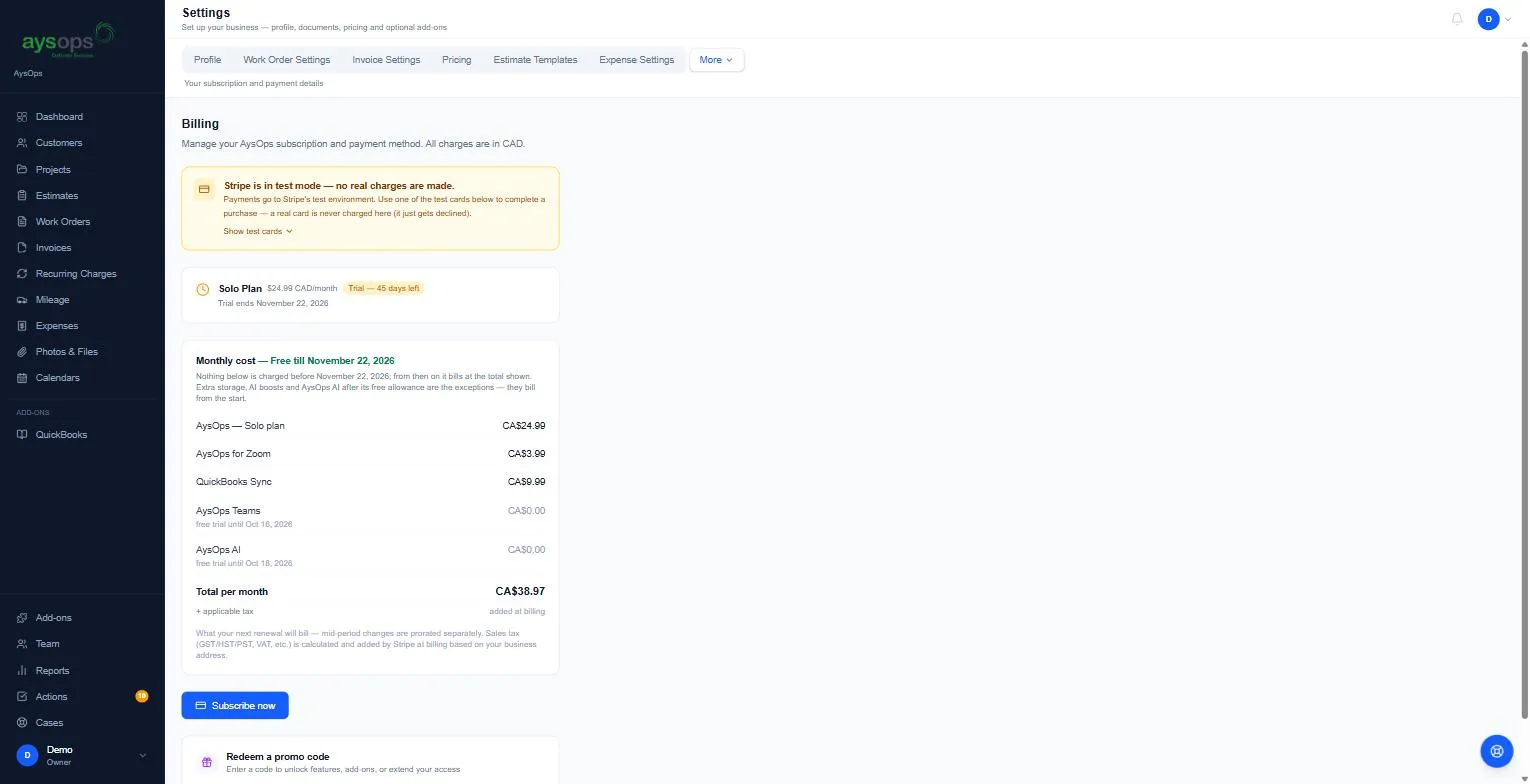
- The top card shows your plan and price (for example Solo Plan, $24.99 CAD/month) and, during your trial, Trial: 45 days left and the date it ends. Once you’ve subscribed it shows Active and Next billing: with the date.
- Monthly cost lists everything you’ll be billed each month: your plan, each add-on, and team seats. During your trial its heading reads Monthly cost · Free till [date]: nothing in the list is charged before then, except extra storage, AI boosts and AysOps AI after its free allowance, which bill from the start. An add-on still in its own free trial shows free until [date], then its monthly price, where the date is the day it starts billing: during your 90-day trial, that is the day the trial ends (or the add-on’s own free days, if they end later). If that day is on or before your next renewal, that renewal bills it, so its price is counted in the total; if not, it shows $0.00 for now. An add-on you’ve cancelled shows ends [date], no further charges. The Total per month is before sales tax; GST/HST/PST is added at billing based on your business address.
Subscribe
Section titled “Subscribe”Every new company gets a 90-day free trial with no card needed.
- Click Subscribe now. You’re taken to a secure Stripe page to enter a card.
- If you subscribe during the trial, you aren’t charged until the trial ends. Your add-ons are then billed together with your plan on one monthly invoice.
Change your card, see past invoices or cancel
Section titled “Change your card, see past invoices or cancel”Once you’ve subscribed, the button reads Manage billing. It opens Stripe’s secure billing page, where you can update your card, download past invoices, or cancel.
Redeem a promo code
Section titled “Redeem a promo code”Type the code in Redeem a promo code and click Apply. Codes can unlock add-ons or extend your access.
You can try up to 10 codes an hour. After that you will see “Too many promo code attempts. Please wait an hour and try again.” Check the code with whoever gave it to you, then try again later.
Some codes lower the AysOps fee on your customers’ online payments for a set time. If you have more than one, each keeps its own end date and you always pay the lowest one still running. For example, 0.1% for 3 months and 0.2% for 6 months: you pay 0.1% for the first 3 months, then 0.2% for the 3 months after that.
What happens next
Section titled “What happens next”- When the trial ends without a subscription, a “Your free trial has ended” screen appears and the company becomes read-only until the owner subscribes: you can still see and export everything, but you can’t change anything. Team members see a message asking them to contact the account owner.
- If your subscription is cancelled (by you in Manage billing, or by Stripe after payments keep failing), the company becomes read-only in the same way. A red bar at the top of every page says “Your subscription has ended, so this account is read-only”, and a “Your subscription has ended” screen appears. Your paid add-ons switch off with the subscription. To come back, click Subscribe again (or go to Billing and click Subscribe now), then turn your add-ons back on in Settings, Add-ons. If you cancelled during your free trial, you keep the trial days you had left.
- If a payment fails, the Billing page shows “Your last payment failed”. Click Manage billing and update your card.
If something goes wrong
Section titled “If something goes wrong”- I can’t see Billing: only the owner and administrators can.
- “Your subscription has ended, so add-ons can’t be turned on”: your subscription was cancelled. Click Subscribe now on the Billing page first, then turn the add-on on.
- The monthly total is higher than the plan price: check the Monthly cost list. Each add-on and team seat has its own line. Extra storage, AI boosts and AysOps AI (after its free allowance) are billed from the start, even during the trial.