
Get help or report a problem
What this does
Section titled “What this does”Sends a question, a problem or an idea to the AysOps team as a case. You can follow it up later under Cases in the menu.
Before you start
Section titled “Before you start”Anyone signed in can do this, from any page. If something just went wrong, report it from the page where it happened: AysOps attaches that page’s details to help us investigate.
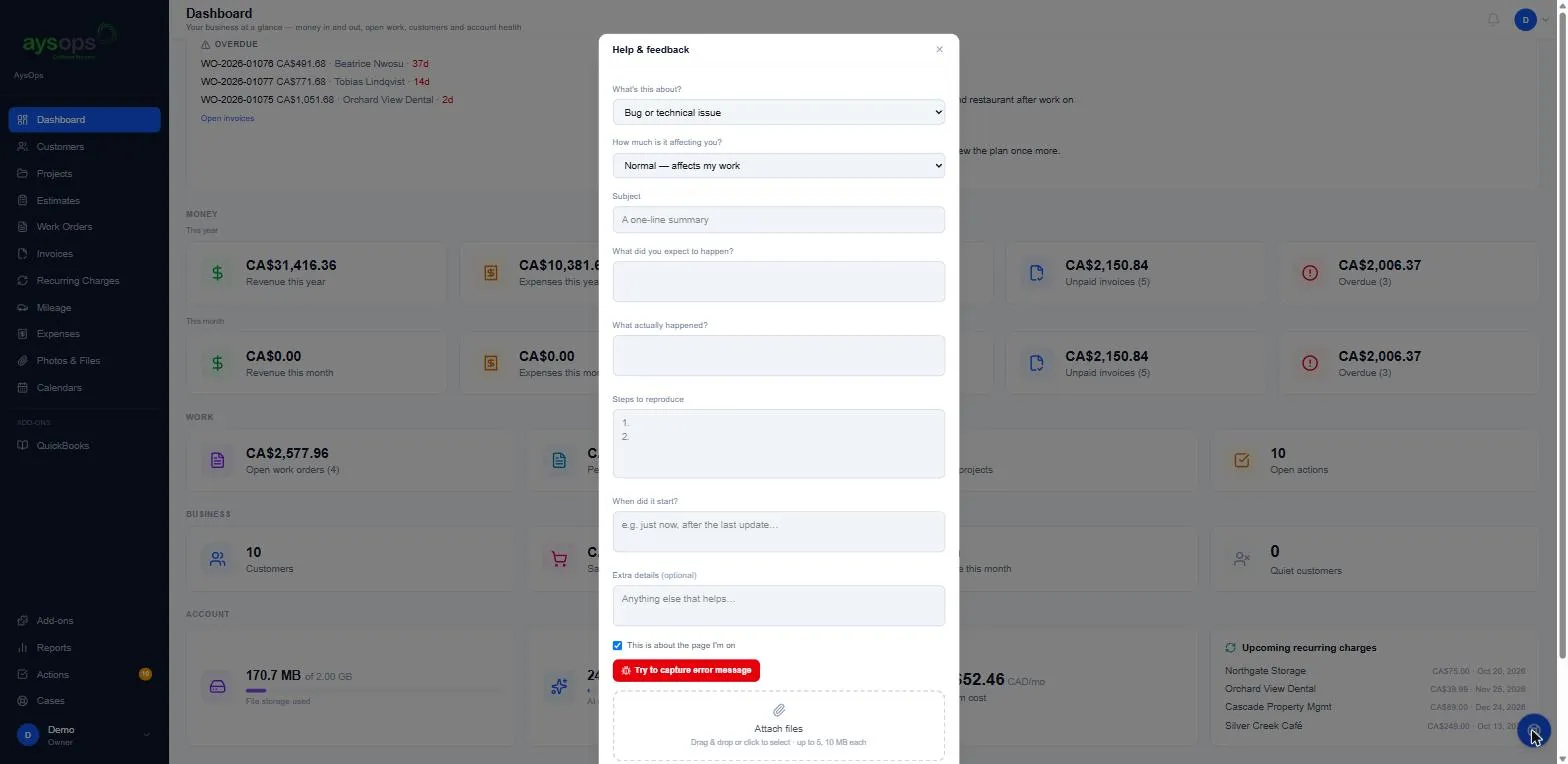
- Click the round blue button at the bottom right of any page. On a phone, tap + in the middle of the bar along the bottom, then Help & feedback. The Help & feedback window opens.
- What’s this about?: choose Bug or technical issue, Feature request, Help or Other.
- How much is it affecting you?: choose Low — minor / cosmetic, Normal — affects my work or Blocking — I can’t continue.
- Subject: a one-line summary.
- For a bug, describe it:
- What did you expect to happen?
- What actually happened?
- Steps to reproduce: what you clicked, in order.
- When did it start? (for example “just now” or “after the last update”).
- Extra details (optional).
- Leave This is about the page I’m on ticked if the problem is on the page you’re on.
- For a bug, click Try to capture error message. AysOps attaches any errors it noticed during this visit. If there were none, it says so, and your description still helps.
- Optional: Attach files. Drag files in or click to choose them: up to 5 files, 10 MB each. A screenshot of the problem helps a lot.
- Click Submit.
What happens next
Section titled “What happens next”- The window says “Thanks — we got it.” and shows your case number.
- The case appears under Cases in the menu, where you can follow it and add more files.
- AysOps attaches your current page and browser details to help investigate. It never includes what you typed into forms.
If something goes wrong
Section titled “If something goes wrong”- “Please verify your sign-in again before continuing”: finish two-step sign-in for this visit (reload the page to be asked), then submit again.
- Some attachments didn’t upload: the case is still sent. Add the files from the case on the Cases page.
- I can’t see the round button: on a phone there isn’t one; tap +, then Help & feedback. On a computer, look at the bottom right of the page, or use Cases → Submit Case.
Related articles
Section titled “Related articles”help, support, contact, report a bug, problem, feedback, feature request, case, ticket, something is wrong