
Reset your password
What this does
Section titled “What this does”Sends you an email with a link to choose a new password. Use it when you’ve forgotten your password. If you know your password and just want a new one, you can also change it while signed in: see Change your password.
Before you start
Section titled “Before you start”You need access to the email inbox you sign in with. If you sign in with Google or Microsoft, you don’t have an AysOps password to reset: use Continue with Google or Continue with Microsoft on the sign-in page instead.
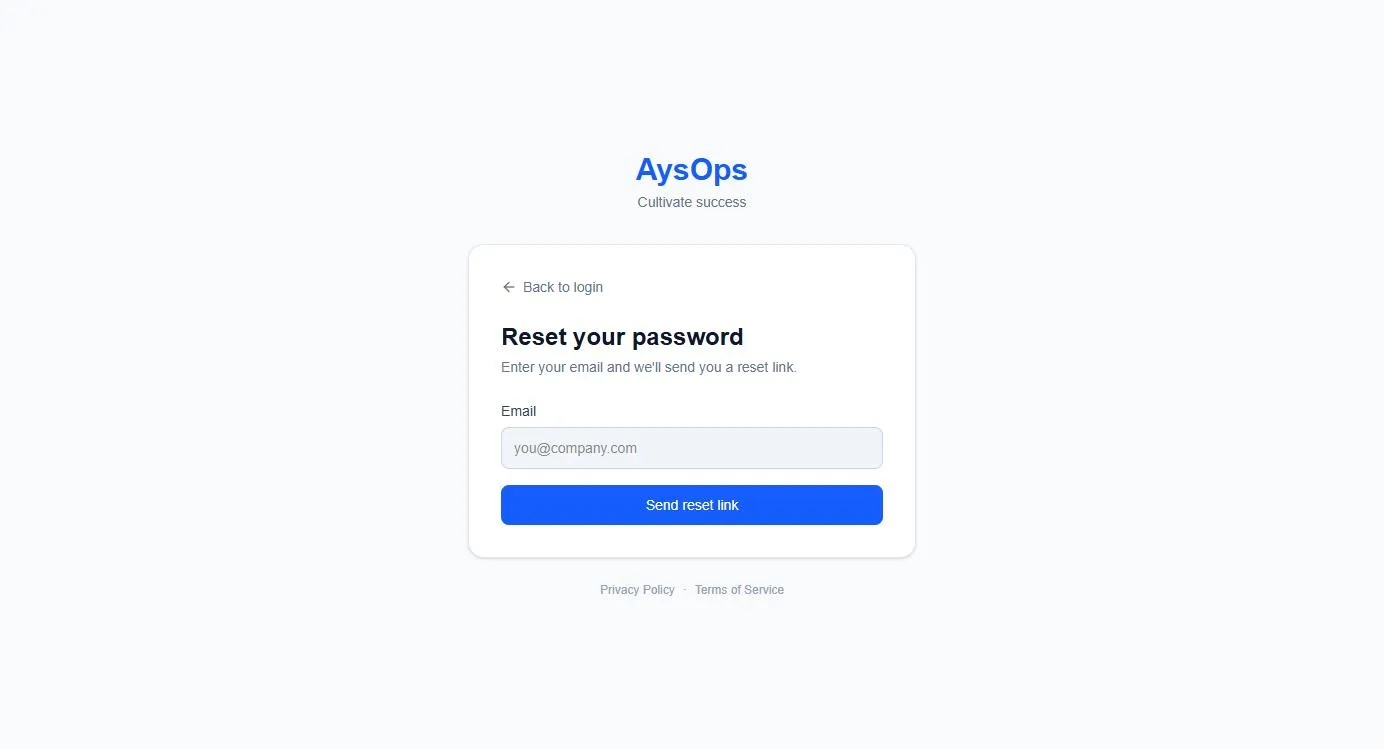
- On the sign-in page, click Forgot password? (on the right, on the same line as the word Password). You’ll see Reset your password and “Enter your email and we’ll send you a reset link.”
- Type your Email.
- Click Send reset link.
- The page says “If that email is registered, a password reset link is on its way.”
- Open the email and click the link. A Set new password page opens. Type your new password (at least 12 characters) in New password and again in Confirm password, then click Update password.
What happens next
Section titled “What happens next”You’re signed in with your new password. Your old password no longer works.
If something goes wrong
Section titled “If something goes wrong”- “The security check did not complete”: a small security check from Cloudflare runs on this page to keep out automated sign-ups and password guessing. Most of the time you don’t see it. If a box appears, tick it, wait a moment, then try again. If it keeps failing, reload the page, or turn off a browser extension that blocks scripts.
- No email arrived: check spam or junk. The message on screen is the same whether or not the email has an account, so also check you typed the address you sign up with.
- “Too many requests. Please wait a few minutes and try again.”: you asked for several emails in a short time. Wait a few minutes; the earlier email may already be in your inbox.
- The link says it has expired: links only work for a limited time. Start again from step 1.
- To go back without resetting, click Back to login.
Related articles
Section titled “Related articles”forgot password, reset password, change password, locked out, can't sign in, password reset email